Monday, 13 August 2012

Analyze the terms as stated below

Closing Date VS Accounting Period


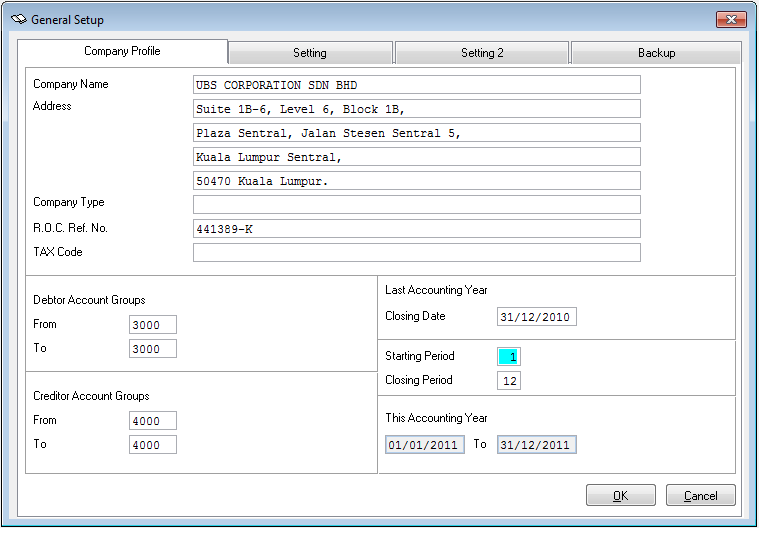
Closing Date is you key in regarding  the last date accounting period. You can see when you key in closing date 31/12/2010 automaticly the Accounting Period can change to 2011.

Accounting Period is Starting Period Accounting Year to Closing Period Accountiong Year. You can adjust the month from January to December which are 1 to 12, but the date Accounting Year automaticly change when you change Clossing Date.


Add Entry VS Quick Entry


Add Entry is a single transaction entry procuder,key in double entry one by one. You may either key in debit entry and followed by credit entry or in revers sequence.

Quick Entry is double transection entry procuder. When you enter one side of double entry, the system will generate the other side of the entry automatically. You must determine what entry can be more time to key ni as Master Account. Master account can be any double entry account and it means the account's entry will be handle by the system.


Edit VS V.Edit


Edit is you may edit single trnsection only. You point first, then you just double click for example double click on the transection you want to edit then click on Edit button , then you can change what you want to change wather the a/c discription or figure in debit or figeure in credit in just one transection.


V.Edit is you may edit multiple trnsection in a batch by cliking the V.Edit button. V.Edit founction allows user to change / edit more then 1 transection in a batch at the same window. It is faster and easier for transections editing compare with the normal Edit function.


Backup VS Restore


Backup is compression of multiple data files from Sage UBS Accounting System into one compressed file and transfer the compressed file to floppy disk / UBS flash drive or hard disk.
You must Select Diskett Drive to C drive. When do backup, the system will generate a file call backup.acc . Then you must rename  backup.acc to new file name for easy to do another backup.


Restore is decompress the compressed file  from floppy disk / UBS flash drive or hard diskin order to recover back the multiple original data files which shall be stored back into the system. Before you doing restore make sure the file name is backup.acc becouse  the system just can read backup.acc file.


Deleting Individual/Business Transaction VS Deleting All Business Transaction


Deleting Individual/Business Transaction is clear only transection and batch titles will be deleted , chart of account and opening balance shall be remain. You can chose Clear only transection-chart & b/f remain at Clear Files/Generate Sample Chart in Sage UBS Accounting System , which is option no2.


Deleting All Business Transaction is all transections, account numbers and batch titles of the data folder will be deleted when you chose option no1. which is Clear both chart of accounts & transections in  Sage UBS Accounting System.

Wednesday, 8 August 2012

Accounting Assumption Page. What is it all about?

Lack of information or data

Based on our experience after learning UBS system, there are many cases that we will find to do a transaction. Different companies have different kind of sources of documents.Some companies have all the data or information that an accountant needed to do a transaction for financial statement and balance sheet but some of them sometimes do not have all the documents or information that we needed. As an accountant, we suppose to know how to overcomes all the problem. For an example, documents for electricity expenses is not available due to the lost of documents. Assumptions figure is used based on the interview with the owner of the company on how much usually they spend for the electricity and ask whether on that particular months the expenses are increases or decreases.

Information or data not available

The information or data not available is actually will effect the accountant during performing their job. For an example, Pizza Hut company have many employees and some of them like to do part time job to gain more income but Pizza Hut company did not record the part time expenses salaries that they give to the employees. They just record the monthly salaries paid to the employee. In this case, if the information or data of part time expenses salaries is not informed to the accountant, it will effect the financial statement. This is because there will be excessive expenses that the accountant can't find from where it comes because there are no supporting documents that record their expenses. Assumption figure is used based on the collecting all the supporting document and ask the in charge person of Pizza Hut company to record back all the expenses  of part time salaries as a prove of their expenses.


New information that need to be inform

As we know, all the companies have the same mission which is to maximize profit and minimize their cost. The different between all the business companies are whether they operate their companies by selling product or service. There are some companies such as Takaful Insurance and Am Bank sell their service but some of companies sell their product such as Giant and Tesco. Not only that, there are also a company that sell product and service at the same time such as Auto-mobile service where they sell their service and at the same time they also sell the accessories for the cars. There is some problems will arise for the accountant to record all the transaction for the Auto-mobile company because the company have two different kind of business. The problem for them is when they want to enter the batches for the company whether they should separate the sales of they should combined the sales. Assumption figure is used by enter two kind of batches which the first one is SALES- for the product sell  and SALES(SERVICE) - for the service sell. Which means that the information assist should be inform so that if the new accountant want to refer back their financial statement, they will know where the sales come from.


EIGHTH CLASS

-LESSON 3-

The new skill for this class is Entering Closing Stock Value of RM48,218.95.
Go to G6. Maintain Stock Value -> click Add->  BS a/c-> click 10x ( the amount can be appear at the box). Then OS a/c and CS a/c... do the same way.
After that, key in at This Year Opening Stock the amount of Closing Stock Value of RM48,218.95.


Monday, 30 July 2012

Mid Semester Examination Is Just Around The Corner

We are on Semester 4. There are 5 subjects we take on this semester which are Accounting Information System, Taxation 1, Advance Accounting 1, Audit 2, and cost Accounting 2. This week starts a tough week for us. We will take our Mid Semester Exam. Accounting Information System (AIS) is the first paper that we have to take. We really hope we get A for this subject and another 4 subjects.

We really do our best for all the papers. Since AIS paper is the first paper, we had make full preparation to do it. As a student, we think group study or group discussion is the best way to remember each point in each chapter so we and our other friends make a study group at MSU library and MSU square.

Besides that, we also get some past year paper from library to do it. At the library, they have given us 2 choices whether we can take the hard copy or the soft copy of question. If we choose to take the hard copy question, we can photo state it in the library but if we take the soft copy, we can save in our pen drive and print ourselves at home. So, we just save the soft copy and print ourselves.


Most of our lecturer give us so much help. They already told us if we do not understand in certain topic, we can see the but we have to make an appointment first to set the date and the time. This is because, during our mid semester examination, the lecturer also get busy with their work.

5 days before the examination starts, mentor mantee had make a programme for us. We got invitation from MSU to breakfasting with our mentor Miss Wan Rohayu and other lecturers too. Since there are many lecturers that teach us also breakfasting with us, we take this chance to ask some question to Madam Fathimatul who also teach us in subject Accounting Information System part theory. She is very kind lecturer and really help us during our preparation before we take the Mid Semester Examination.


Sunday, 29 July 2012

Progress of UBS_CSR Project May 2012 Until 24th July 2012

Syukur Alhamdulillah now, we already get our potential company for the project, Morecap Sdn Bhd. Miss Hazira who is the Purchasing Coordinator at Morecap Sdn Bhd help us a lots in making appoinment and finding all the documents that we need. During the first time we went to the company, she really interested in our project and feel excited to help us. Thanks to her to giving us a chance to choose their company as our project for AIS.


Now we already get the document from Morecap company, we show to our lacture. Mr.Noreffendy take a look of our documents.


Alhamdulillah Mr Effendy accept our chosen documents and give compliment to us because we had complete our steps by steps before Mid Semester Examination. Even there are some document that we cant't find which is Cash Book.The company do not have Cash Book because all the payment made by the company are through bank in or check Now, Mr Effendy ask us to translate our documents' information into a ledger so that we can make a trasaction.


The new skill we learn at   "SEVENTH CLASS"

-LESSON 3-


How to handle Opening Balance.

Step 1 TO Step 8 are same with prevos we learn..
Step1 - Creat new company director at select compny menu
Step2 - Sign in at UBS interface
Step3 - Update company profile
Step4 - Clear file = choose option 1
Step5 - Add 19 new chart of accounts
Step6 - Add 9 new batches
Step7 - Add 4 new debtor
Step8 - Add 2 new creditor
NEW For TODAY
Step9 - Fultering Opening Balances. Go to General -> Enter Opening Balance ( you can see at with Income & Expenses Account is no right tick and blur..it is for the company just started the business... When the company all reday run the business..which is have opening balance "prepaid",
Soo.. you can change the starting "periods" from 1 to 2, 

then.. see the effect of change "periods". -> you can see Income & Expenses Account now have right tick and not blur whish is black colur )

Step10 - As usual remember!! do Backup.


Tuesday, 17 July 2012

Experiencess In Serching Potential Companies From UBS MSU CSR Project

Alhamdulillah, this week our chosen company MORECAP already agreed to receive our permission tho choose their company for our UBS Project. They agreed to give us documents which all the data in those documents need to translate to UBS system.

On 18th july 2011, Wednesday, we went to their office which is located in Bukit Jelutong Shah Alam. Actually, MORECAP office are the part in other company which is TRISYSTEMS ENGINEERING SDN BHD.


Our appointment with the Mr.Rosman Bin Salim as Director of MORECAP is at 12.00 p.m. The Director of MORECAP company give us all his commitment to us even he is busy at that time. He also ask us some question about our Accounting Information Subject. We interviewed him to get some information that can help us to do SWOT analysis in our project. 


After we interviewed him, he ask his assistant to help us in finding all the documents that we need for our UBS System. The document that we find are Invoice, Bank Statement and ..... We photo-state by ourselves since there are too many documents that they give us. We bring our own A4 paper to photo-state. We spent our time at the office less than 1 hour because they have their own work to do.


Tuesday, 10 July 2012

UBS skill that i have learn until now.

-LESSON 1-

COMPANY SETTING - Go to Housekeeping -> Setup -> General Setup -> Company Profile
 ( key in company details and accounting period )

CREATE CHART OF ACCOUNT - Go to General -> General Ledger a/c Maintenance
 ( key in account number,account description and account type must be correct)

ORGANISE BATCHES - Go to Transaction -> Organise Batches
( key in batches. use short form if do not have enough space )

TRANSACTION - Go to Transaction -> Transection File Maintanance
( key in the double entry by using Add or Quick Entry. Quick entry use for master a/c, so not to key in many time for the same entry )        

VIEW / PRINT REPORT - Go to Report
( select report that want to view or print )

BACKUP & RESTORE - Go to File -> Backup and Restore
( make sure the data derectory is correct )

CLEAR FILES - Go to Houskeeping -> Clear Files / Generate Sample Chart
( clear all files if want to empaty the folder.   


Fifth class

This class we learn regarding Lesson 2. before we enter the class we make sure... we already trenslate assignmnt 2 - transection to journal.

-LESSON 2-

  • Step1 -We must create new directory (company name : noor.rose_BIA then.. Directory : ASGN2 )
  • Step2 - At UBS interface, we must key in User, Password, then Date : remember that system using year 2010.. so we make sure, we key in  year 2010 not 2012)
  • Step3 - At update company profile menu, make sure key in 1. company name follow the information assignment2 given (Super Grocery Enterprise), 2. Closing date is 31/12/2009, then 3. we can see the accounting period automatically change to 01/01/2010 to 31/12/2012.
  • Step4 - Go to Housekeeping clear  file / Generate sample chart, choose option 1
  • Step5 - Add new 12 chart of accounts an remember "+" Retained Earning Account (1050/000),  Type : A, Special a/c : PA - are you still remember? PA stand for Profit Account.
  • Step6 - Add new 7 batch (Purchase Journal, Sales Journal , Cash Book (Bank), Cash Book (Cash), General Journal, Returns Outwards, and the last but not less Returns Inwards.)
  • Step7 - Add 3 new debtors. Go to Debtor -> Debtor File Maintenance ->click Add button->then key in particulars for debtor (For example key in: A/c no. 3000/S01, Name : Santronic Computer, Address : 111, Jalan SS/2,PJ, the telephone no. : 03-7890 0000 ).
  • Step8 - Add 2 new Creditor. Go to Creditor-> Creditor File Maintenance->then click Add button -> then key in particulars for creditor (For example key in: A/c No. : 4000/C01, Name : Clipper Corporation, Address : 312, Jalan Putih, KL,  Telephone no. : 03-4294 4444 )
  • Step9 -  We do Backup . Go To File -> Backup and Restore  ->Click Backup. Then minimize UBS Accounting  -> open my computer -> rename" Backup.acc" to Backup.acc2noorrose.

Sixth class


For this class we continue Lason 2.
  • Step1 to Step4 are same with previos class ( fifth class ). To check back all data key in pass class. Go to General-> click Print Chart of Accounts -> the result is no chat... dont wory we can restore back.
  • Step5 - To restore, minimiza UBS Accounting-> open my computer -> go to C drive ->choose Backup folder -> rename file "Backup.acc2noorrose" to original "Backup.acc ". then maximize UBS Accounting -> go to File-> cklik "Restoe" to restore file.
  • Step6 - Continue entering business transection using QUICK ENTRY.
  • Step7 - Do Backup . Go To File -> Backup and Restore ->Click Backup. Then minimize UBS Accounting -> open my computer -> rename" Backup.acc" to Backup.acc2noorrose.


Thursday, 5 July 2012

My 1st Blog Post Regarding Accounting Information System(DAC2104) Mini Blogging Project

On 12th June 2012, we started our class User Business System (UBS) Accounting Information System at Lab 408, Science Building, Management Science University.


Mr. Noreffendy Bin Mohamed is the lecturer that will teach us this subject for this semester.

On the first day,Mr. Noreffendy briefly explain to us about what we will learn on this subject and he  suggest the guide line book that we can refer is " Sage UBS Accounting Work Book 2011 Edition ".


First class.
We exposed to UBS Accounting Information System which it is different between manual accounting and computerized. UBS can helps us to convert an organization that use manual accounting system to computerize accounting system.

Since Sir Afendi already gave us UBS Accounting Information System Project in our first class, we think that we must give full commitment by always come to class and pay attention to what he explain in the class because all the information that he give are important for us to follow to make sure we are in the same track.
We are required to identify business organization that uses manual procedure in recording its business transactions until the preparation of final accounts.


Second class.
We are able to use the computerized accounting software which is UBS.  We fill so exited because this is the first time we have been exposed and learn about  UBS.
When first we used UBS, we feel very excited but Sir Afendi told us that all data can easily loss if we misclick the keyboard. So, he advice us to be careful and follow each step that he teach and try to ask him if we do not understand.


Lesson 1  

-Regarding a newly formed company, whose first month's activities involved only cash transaction. There is no opening balance, no debtor, no creditor and stock value. The starting period is 1
  • Step 1 - we create new company data - key in company name then directory.
  • Step 2 - at UBS interface - key in user, password then date.
  • Step 3 - update new company profile - key in company name , closira  date, and accounting period.
  • Step 4 - add 8 new Chart of Account ( Ledger ), for example account no: 1000/00, a/c description: Capital, Account Type :A, and don't for gate Special a/c : PA(profit a/c) for Retained earning a/c description.  
  • Step 5 - Enter 7 new Batches (Journal) - for example: key in - no:1, type: credit, titles: Sales Journal-Jan08, Period:1 (1 stand for January).


Third class.

We continue learn Lesson 1 using UBS. 1st and 2nd step are same with we learn 2nd class.
  • Step 3 - Clear file. go to  -> Houskipping ->click Clear file ->chose no.2 : clear only transection.
  • Step 4 - Check the availability of chart"Chart of Account" and "Batches or Journals".
  • Step 5 - Entering business transection using "Add Entry" . Go to Transection -> click transection file mantainance -> click Add button to use Add Entry. Eg; key in at batch no : 5 ( no.5  refer to Cash Book (Bank) journal, Period : 1 (refer to Jan), Date : 01/01/08, A/c no : 1000/000 (refer to Capital Chart) Capital will apper on top of Desp, Desp. :key in opeposite a/c desp, which is  Bnak a/c(Debit), Amount :50,000 (key in in credit side, -> click Save Button.


Regarding UBS project 
For our first step, we went to the FACULTY OF BUSINESS MANAGEMENT AND PROFESSIONAL STUDIES [FBMP] Deans Office at Level 10 to get the Student Confirmation Letter which is Ressearch Form or Project Form, the permission letter is important to help us find the data from the company that we choose. That letter had been processed for 3 days.

Our fist company we find  is Faridah Maju Enterprise


We already meet the employees of this company but they said we must make an appointment to see the Manager. Unfortunately on the day we went to the company, their manager is not around so we have to find another day to make an appointment again or wait for the company to call us. We hope they will call us and give a good story because with what Mr.Afendi told us, our senior had made a record where 22 company had reject their permission to ask for the data. We hope we are not the next record. Amin.

Fourth Class 


We still continue with lesson for the past class. This time we learned how to backup and restore our account. Sir Afendi always remind us about our project and complete our assignment which is this blog! :)